A few years ago, the idea of wearing a camera, speakers and an AI assistant on your face would have sounded like science fiction. Today, you can walk into an optician, try on a pair of Wayfarers, and leave with glasses that take photos, play your music, answer your calls and respond when you talk to them.
Here at Visioncare Opticians on Baker Street, we’re asked about smart glasses more and more. Are they comfortable? Do they work with my prescription? Do I actually need them? This guide answers those questions: what smart glasses are, what they can do, who they suit, and what to think about before you choose a pair.
So, what exactly are smart glasses?
Smart glasses are regular-looking eyewear with technology built into the frame. Depending on the model, that can include a camera, microphones, speakers, a battery, a processor and a wireless connection to your phone.
The best smart glasses don’t look like tech. They look like glasses. The aim isn’t to change how you look, but to add a handful of genuinely useful features to something you already wear every day.
Ray-Ban Meta glasses are the clearest example. They’re made in partnership between Ray-Ban and Meta, and they keep the classic Ray-Ban styling people already know, including the Wayfarer shape, while the technology sits discreetly inside the frame and arms.
What can Ray-Ban Meta glasses actually do?
This is where smart glasses stop being a concept and start being practical.
Capture photos and video hands-free
A small camera sits in the frame near the hinge. Tap the button on the arm or use your voice, and you can take a photo or start recording video from your point of view. The Gen 2 range features an ultra-wide 12MP camera that captures photos and 3K video.
It sounds like a small thing until your hands are full: cycling, cooking, holding a child, walking the dog, carrying shopping. You capture the moment as you see it, without reaching for your phone and losing the moment in the process.
A small LED lights up while the camera is recording, so people around you know what’s happening. We’ll come back to that in the privacy section.
Listen to music and podcasts without earphones
Tiny open-ear speakers in the arms of the glasses point towards your ears. You hear your music, podcasts or audiobooks clearly, but nothing blocks your ear canal, so you stay aware of the world around you.
For walkers, commuters, runners and cyclists, that’s a real benefit. You can hear traffic, conversations and announcements while your playlist carries on. And with nothing in your ears, there’s no fiddling with earbuds and nothing to lose down the back of the sofa.
Make and take calls
The same speakers and a set of microphones handle phone calls. You can answer, chat and hang up without touching your phone, and the microphones are designed to pick up your voice clearly, even outdoors.
Talk to Meta AI
This is the part that makes the glasses feel truly “smart.” Say “Hey Meta” and you can ask questions, set reminders, send messages, get quick answers, ask for directions or control your music, all by voice. The Gen 2 glasses are powered by Meta’s Llama 4 AI model, which lets you interact with Meta AI hands-free.
Because the glasses have a camera, the AI can also help with what’s in front of you. Look at a landmark, a menu in another language or an unfamiliar plant and ask what you’re looking at. It’s a bit like having a knowledgeable friend beside you who can see what you see.
Live translation
Ray-Ban Meta glasses can translate speech between supported languages, and Meta has expanded live translation support in the Gen 2 range to include German and Portuguese. For travellers, or anyone who regularly talks with people in another language, that can be genuinely useful. Language availability changes with software updates, so check the current list.
How do they work?
You don’t need to be technical to use smart glasses, but a quick overview helps.
The glasses connect to your smartphone by Bluetooth and Wi-Fi, and you manage them through a companion app. The app is where you set up the glasses, adjust settings, and import the photos and videos you’ve captured so you can edit and share them.
Charging is simple. The glasses come with a charging case that looks like an ordinary glasses case. Pop them in when you’re not wearing them and they top up. Gen 2 glasses offer up to eight hours of battery life on one charge, with the case adding around 48 more hours. That’s plenty for most days, though heavier features like continuous video recording or extended AI use will use the battery faster.
The range also keeps developing. The newer Gen 3 glasses add Aviator and Zena styles alongside the Wayfarer, with up to nine hours of battery life. Technology moves quickly, so ask us what’s currently available when you’re ready to choose.
We tried them for a week
Before writing this guide, we wanted to know what it’s really like, so Arifah, our optometrist, wore a pair of Ray-Ban Meta glasses for a week.
What I used most: the guided directions. I asked for directions by voice and heard them through the speakers in the arms, which kept my eyes up and my hands free. It was also a relief not to have my phone out in my hand on the streets of London, where someone could snatch it.
The surprise: at first, I was very conscious of recording as I went along. I kept thinking about the camera and about the people around me. But it didn’t take long before it felt natural, and by the end of the week I’d stopped thinking about it.
What I loved: Super useful not having to pull out my phone every 2 minutes!
The downside: they felt heavy compared with a normal pair of glasses. Weight is personal, so it’s worth trying a pair on and wearing them for a while before you decide.
Don’t just take our word for it

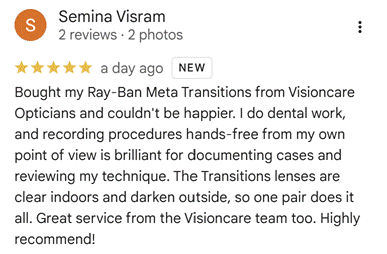
“Dr. Visram collecting their Ray-Ban Meta glasses at Visioncare Opticians, Baker Street.”
Can you wear them with a prescription?
This is the question we hear most often, and the answer is yes.
Ray-Ban Meta glasses are designed to work with prescription lenses. Meta states that supported models cover nearly all prescriptions, including short and long sight, astigmatism and varifocals, within a defined power range. Some frame styles have narrower ranges than others, so the right frame depends on your prescription.
This is where getting your smart glasses through an optician makes a real difference. A good fitting matters more than most people realise. The lenses need to be centred correctly for your eyes, the frame needs to sit at the right angle, and the nose pads and arms need adjusting so the glasses stay comfortable for hours. That’s true of any glasses, and it’s doubly true when the frame carries a battery, a camera and speakers. We can check your prescription, recommend a suitable frame and lens, and make sure everything is measured and fitted properly.
If you also spend long hours on screens, ask us about Eyezen lenses, which are designed to help with digital eye strain and blue light. They can be combined with smart frames just as they can with any other glasses.
Who are smart glasses for?
You don’t have to be a tech enthusiast. Here are some of the people who get the most from them.
Busy parents and carers. When your hands are full, capturing a first step, a school play or a spontaneous moment without reaching for a phone is a big draw.
Commuters and walkers. Music, podcasts, calls and voice directions without earphones or a phone in your hand make the daily journey easier, and you stay aware of what’s around you.
Travellers. Translation, quick answers about what you’re looking at and hands-free photos suit exploring somewhere new.
Sports and outdoor fans. Cyclists, hikers and runners can enjoy music and capture footage without carrying anything extra.
Content creators. A point-of-view camera that’s always with you opens up a different style of filming.
People who like simple, useful tech. If you want a few practical features without a screen constantly demanding your attention, glasses are a gentle way in.
Meta also positions the glasses as helpful for people with reduced vision, hearing or mobility, since voice control can make everyday tasks easier.
Smart glasses and privacy: what you should know
Any device with a camera raises fair questions about privacy, so let’s be straightforward.
Ray-Ban Meta glasses have an LED that lights up when the camera is capturing, which is designed to signal to people nearby that you’re recording. As with any camera, common courtesy and local rules apply. Don’t record where filming isn’t permitted, such as changing rooms, and be thoughtful about filming people who wouldn’t expect it.
It’s also worth spending a few minutes in the app’s privacy settings when you first set the glasses up. Look at what data is shared, how voice interactions are handled and what’s stored on your phone. It takes very little time, and it means you’re using the glasses on your own terms.
What to think about before you buy
A few practical questions will help you choose well.
Do you need a prescription? If so, get advice from an optician before you order. The frame shape, your prescription and the lens type all affect the final result.
Which style suits you? Frames sit differently on different faces. Trying a few on is the easiest way to find the one that feels right. Comfort, weight and the fit around your nose and ears matter more than any specification.
Clear, sun or Transitions lenses? Many people choose sun lenses, but clear lenses and Transitions lenses, which adapt to the light, are useful if you want to wear them indoors and out.
How will you use them? If it’s mainly music, calls and directions, battery life won’t trouble you much. If you plan to film a lot, think about your charging habits.
What’s your budget? Prices vary by generation, frame style and lens choice, and the range keeps changing, so ask us for the current cost when you come in.
Do you want proper aftercare? It’s easier when the people who fit your glasses can also adjust them, answer set-up questions and be there if something needs attention later.
Care and everyday use
- Keep them in their case when you’re not wearing them, so they charge and stay protected.
- Clean the lenses with a microfibre cloth, and keep the camera area clear of smudges for better photos.
- They’re splash-resistant rather than waterproof, so light rain or sweat is fine, but don’t submerge them.
- Update the software through the app. New features and improvements often arrive this way, so your glasses can get better over time.
The bottom line
Smart glasses aren’t about replacing your phone or changing who you are. They’re about taking a few things you already do, like taking photos, listening to music, making calls and finding your way around, and making them easier and more natural.
Ray-Ban Meta glasses stand out because they get the basics right: they look like classic Ray-Ban glasses, they work with prescriptions, and they add useful features without asking you to learn a new way of living. For many people, that’s exactly the right level of “smart.”
The best way to decide is to try a pair. See how they feel, look in the mirror, ask questions, and talk through your prescription with someone who can fit them properly.Curious? Book an appointment with us at Visioncare Opticians, Baker Street, and come and try Ray-Ban Meta glasses for yourself: https://visioncare-opticians.com/book-an-appointment/